Link-Up Play Guide in eFootball 2026 – eFootball
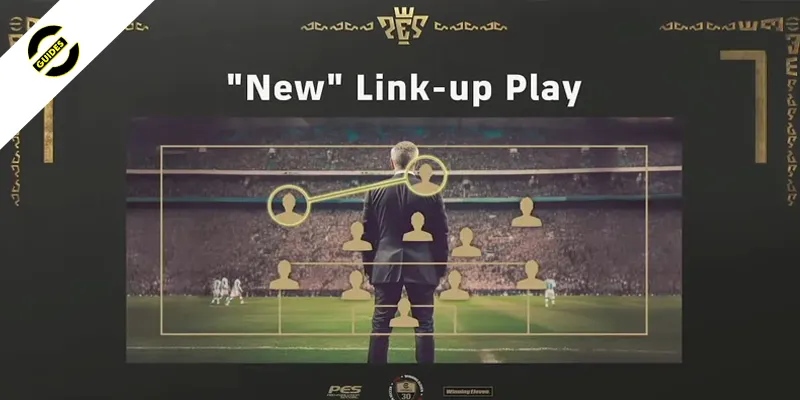
Master the new Link-Up Play mechanic in eFootball 2026. Learn how to assign key players, trigger combos, and build meta tactics around it.
Table of Contents
If you want smarter runs and cleaner through balls in eFootball 2026, you’ll need to master Link-Up Play. You’ll pair a creative Centrepiece with an attacking Key Man, set the right manager profile, and time passes off the run indicator. The trick is positioning and playstyle harmony, not just player ratings. Get those right, and your attacks feel scripted in your favor. Miss them, and the boost fizzles—here’s how to stack the odds.
Key Takeaways
- Activate Link-Up by pairing a Centrepiece hub with a Key Man runner; keep them 10–15 meters apart in buildup to unlock boosts.
- Use compact shapes (4-2-3-1, 3-4-1-2) with Centrepiece at CM/CAM and Key Man in adjacent AF/HF channel for consistent lanes.
- Time through balls when the Key Man’s run arrow turns solid; release 0.3–0.6s after, earlier with aggressive counter managers.
- Assign roles: Centrepiece on Short Pass/Hold Position; Key Man on Get In Behind/Roam; enable Link-Up Play in match settings.
- Choose possession/creative or aggressive counter managers to extend activation windows and sharpen passes; avoid opposing styles that delay timings.
What Link-Up Play Does and Why It Matters
When Link-Up Play activates, your Centrepiece and Key Man sync up so the Key Man gets sharper movement and passing benefits, leading to faster runs, cleaner through-ball receptions, and higher-quality chances. You’ll notice tougher passes suddenly land, through-balls hit stride, and attacks flow with fewer wasted touches. It works across console and mobile games, and it’s especially impactful if you’re trying a new mobile squad in mobile gaming.
What makes it matter? You can toggle it mid-match, it never hurts squad ratings, and it scales with your manager’s approach. Choose aggressive counters or creative play to amplify speed and pass quality during link-ups. Match positions and playstyles correctly and the new features consistently trigger, turning half-chances into goals while keeping your patterns crisp and repeatable.
Roles Explained: Centrepiece, Key Man, and Their Synergy
You’ve seen how Link-Up Play boosts passes and runs; now it’s time to name the gears that make it work: the Centrepiece and the Key Man. The Centrepiece is your hub. Their playstyle and spot on the pitch set the activation rules and unlock boosts for passing lanes and combinations. The Key Man syncs to that hub; his off‑ball timing and compatibility trigger sharper through balls and quicker runs.
Meet the roles and synergy:
| Role | What it does | You watch for |
|---|---|---|
| Centrepiece | Sets conditions; unlocks boosts | Right playstyle and zone |
| Key Man | Times runs; activates windows | Movement into channels |
| Pairing | Enables faster combos | Through-ball cues |
Toggle Link-Up on when you see the Key Man’s run primed; feed the lane early.
Choosing the Right Manager for Maximum Link-Up Effects
Although Link-Up Play starts with your Centrepiece–Key Man pairing, the manager you choose unlocks its ceiling. You need a coach whose playstyle and tactical instructions amplify passing lanes, trigger sharper runs, and keep squad balance intact. With the right fit, you’ll see crisper through balls, quicker support, and a longer activation window—up to roughly 15% over neutral managers. Don’t let a mismatch throttle assisted pass accuracy or delay timings; align the philosophy to your duo and you’ll convert more high-value chances. If your mode permits, switch managers mid-match when you need a surge.
1) Match playstyles: e.g., possession coach for Creative Playmaker + Hole Player.
2) Prioritize passing/movement boosts (Mourinho-style bonuses).
3) Favor aggressive counters or forward-facing buildup.
4) Avoid opposite-style managers that blunt Link-Up benefits.
Building Your Squad to Trigger Link-Up Conditions Consistently
With the right manager in place, the next step is building a lineup that hits Link-Up conditions on every attack. Start by selecting a Centrepiece and Key Man whose playstyles match Link-Up requirements—think Creative Playmaker at CM/CAM and Hole Player at AM/CF. Keep them in their required positional zones and within 10–15 meters during buildup to open crisp passing lanes.
Prioritize starters with 90+ fitness and team chemistry so the boost persists past 75 minutes. Choose a manager whose tactical style multiplies passing quality and forward run speed; the attribute bump turns marginal through balls into clear chances.
Lock in roles that complement each other: set the Centrepiece to Short Pass/Hold Position and the Key Man to Get In Behind/Roam. Finally, enable Link-Up Play in match settings.
Setting Up Formations and Playstyles for Smarter Runs and Passes
Before kickoff, anchor your Centrepiece in a central creative slot (CM/CAM with Creative Playmaker) and park your Key Man in the adjacent channel (AF/HF) to meet Link-Up activation. Build around this spine so passing lanes stay short and forward options stay live. Favor compact shapes that form easy triangles and give your Centrepiece clean outlets into space.
1) Pick managers with aggressive counter tactics; you’ll boost Key Man burst speed and sharpen the Centrepiece’s through-ball quality for crisper vertical punches.
2) Assign the Key Man Hole Player or High Forward; you’ll trigger timed penetrations while the Centrepiece holds and releases riskier passes.
3) Use 4-2-3-1 or 3-4-1-2 to keep triangles tight and link routes frequent.
4) Toggle Link-Up in attacking thirds; adjust width/depth so lanes stay high-percentage.
In-Match Tips: Reading Key Man Runs and Timing Through Balls
Once Link-Up Play activates, read the Key Man’s run indicator like a cue: when the arrow turns solid, their committed burst is on and you’ve got a 0.6–1.2s window to thread the through ball. Keep your Centrepiece 18–30 meters from goal and slightly deeper than the Key Man; that positioning opens diagonal or vertical lanes for 25–35m passes.
Trigger the through ball (L1/LB + X/A or the Link-Up through command) as the Key Man crosses the defender’s shoulder—about 0.3–0.6s after the indicator lights. That timing beats offsides and exploits the defender’s momentum. With aggressive counter managers, the Key Man gains ~8–12% sprint speed, so release a fraction earlier to hit the space. Against compact blocks, bait a lateral run to drag a center-back, then slip a 10–15m weighted pass into the vacated channel.
Troubleshooting: Common Mistakes and Quick Fixes
Even if your buildup looks clean, Link-Up Play won’t fire if the basics aren’t right. Start by confirming role and playstyle compatibility: your Centrepiece and Key Man must match the required archetypes or the boost won’t trigger. Then verify the feature is enabled in match settings. If it’s on and still underwhelming, audit your manager choice and player attributes.
1) Validate roles: pair a suitable Centrepiece (e.g., Creative Playmaker) with a compatible Key Man (e.g., Hole Player). Mismatches block activation.
2) Toggle check: ensure Link-Up Play is ON before kickoff; otherwise nothing triggers.
3) Manager alignment: pick tactics that amplify the combo; incompatible managers dilute boosts.
4) Run and quality check: monitor radar for Key Man runs; adjust instructions, swap to faster profiles, and ensure Centrepiece passing and team chemistry support clean delivery.
Frequently Asked Questions
Does Link-Up Play Affect Stamina or Injury Likelihood Over a Match?
No, Link-Up Play doesn’t directly affect stamina or injury likelihood. You’ll see normal fatigue from sprints and presses. If you trigger more runs and counters, you’ll naturally tire attackers faster, but injuries follow standard gameplay factors, not Link-Up mechanics.
Can Link-Up Work in Online Matchmaking With Latency or Desync?
Yes, it works online, but latency reduces responsiveness. You’ll still get boosted runs and passes, yet delayed inputs can mistime triggers. Prioritize low-ping servers, wired connections, and simple patterns; avoid risky through balls when desync spikes to maintain consistency.
How Do Weather or Pitch Conditions Influence Link-Up Effectiveness?
They subtly reduce effectiveness. In rain or heavy pitches, you’ll see slower ball speed, heavier touches, and shorter run timing windows. Adjust tactics: lower pass power, use tighter support range, prioritize balanced tempo, and trigger earlier through balls.
Are There Hidden Player Traits That Secretly Boost Link-Up Triggers?
Yes. You’ll trigger link-ups more with traits like One-Touch Pass, Through Passing, First-Time Shot, Fox in the Box, Pinpoint Crossing, and Incisive Run. Stack chemistry, familiarity, and stamina; avoid Heavy Touch and inconsistent Form.
Does Link-Up Impact Set Pieces or Only Open-Play Sequences?
It only affects open play. You won’t trigger Link-Up on corners, free kicks, or penalties. Still, you can exploit momentum: set pieces can reset shapes so you quickly re-enter open-play patterns and spark Link-Up immediately after.
Conclusion
You’ve got the tools to make Link-Up Play your team’s cheat code. Pair a creative Centrepiece with an aggressive Key Man, pick a manager who amplifies possession or counter rhythms, and keep them close in compact shapes. Watch for the solid run indicator and release the through-ball half a beat later. Match playstyles, stay patient, and recycle if the lane closes. With clean spacing, sharp timing, and smart triggers, you’ll carve defenses open—consistently and ruthlessly.


Analyst. Tactician. Content creator. Since 2023, Amin has been breaking down the eFootball meta—covering Tactics, Dream Team, Player Builds, and Rewards & Coins—to help players climb ranked with data-driven, practical guides.
Related Blog Posts